Token Portfolio & Balances
Most approaches to finding what tokens a wallet holds require either indexing the entire chain or depending on a third-party indexer like Etherscan or The Graph. Nethereum.TokenServices takes a different approach: it ships with thousands of known tokens per chain (embedded from CoinGecko token lists) and checks all of them against a wallet address using batched multicall — hundreds of balanceOf reads in a single eth_call. No indexing infrastructure, no third-party API dependency for discovery. You get a complete portfolio in seconds from any standard RPC endpoint.
Pricing is optional and uses CoinGecko's free tier. The core balance pipeline — token list + multicall — works with nothing more than an RPC connection.
Use this guide when you are:
- Building a portfolio dashboard without running an indexer
- Scanning thousands of known tokens against a wallet via multicall
- Adding CoinGecko prices to balance results
- Scanning multiple wallets or chains in parallel
- Refreshing token data incrementally via Transfer events
Prerequisites
Install the package:
dotnet add package Nethereum.TokenServices
You need an RPC endpoint for the chain you want to query. The examples below use Ethereum mainnet (chain ID 1). No API keys are required for balance queries. Pricing calls use the free CoinGecko API tier, which has rate limits (see Common Gotchas at the end).
How It Works: Known Token List + Multicall
The key insight is that you do not need to index the chain to find tokens. The package ships with an embedded list of thousands of known tokens per supported chain (sourced from CoinGecko token lists). The pipeline:
- Load the token list — On first call, the service loads the embedded token list for the chain (e.g., ~1,000+ tokens for Ethereum mainnet). This list includes contract addresses, symbols, names, and decimals. No network call needed — it is bundled in the package. Optionally, a background refresh pulls updates from CoinGecko and caches them.
- Batch multicall — For every token in the list, a batched
eth_callvia the Multicall contract readsbalanceOf(account). The default batch size is 100 tokens per call, so checking 1,000 tokens takes ~10 RPC calls. This is orders of magnitude faster than calling each token contract individually, and it works against any standard RPC endpoint — no archive node, no indexer, no special API. - Filter non-zero — Only tokens with a non-zero balance are returned (by default), so the result is the wallet's actual holdings.
- Optional pricing — If requested, contract addresses of held tokens are sent to CoinGecko's price API to attach USD (or other currency) values.
The result is a List<TokenBalance> where each entry carries the token metadata, the raw balance, the decimal balance, and optionally a price and computed value.
Quick Start: Get All Balances With Prices
The most common operation is a single call that returns everything a portfolio UI needs:
using Nethereum.TokenServices.ERC20;
using Nethereum.TokenServices.ERC20.Balances;
using Nethereum.Web3;

var web3 = new Web3("https://eth.llamarpc.com");
var tokenService = new Erc20TokenService();

var balances = await tokenService.GetBalancesWithPricesAsync(
    web3,
    "0xd8dA6BF26964aF9D7eEd9e03E53415D37aA96045",
    chainId: 1,
    vsCurrency: "usd",
    includeNative: true,
    nativeToken: NativeTokenConfig.ForChain(1, "ETH", "Ether"));

foreach (var b in balances.Where(x => x.Value > 0).OrderByDescending(x => x.Value))
{
    Console.WriteLine($"{b.Token?.Symbol ?? "ETH"}: {b.BalanceDecimal:N4} @ ${b.Price:N2} = ${b.Value:N2}");
}

decimal totalValue = balances.Sum(b => b.Value ?? 0);
Console.WriteLine($"Total portfolio: ${totalValue:N2}");
The NativeTokenConfig.ForChain helper creates the metadata needed to include the chain's native currency (ETH on mainnet) alongside ERC-20 tokens. If you omit nativeToken, the service uses sensible defaults for the chain ID, but providing it explicitly lets you control the symbol and name shown in your UI.
Understanding the Results
Every call returns List<TokenBalance>. Here is what each object contains:
| Property | Type | Description |
|---|---|---|
Token | TokenInfo | Metadata: Address, Symbol, Name, Decimals, LogoUri, ChainId, CoinGeckoId |
Balance | BigInteger | Raw balance in the token's smallest unit (wei for 18-decimal tokens) |
IsNative | bool | true for ETH/MATIC/etc., false for ERC-20 tokens |
BalanceDecimal | decimal | Balance converted using Token.Decimals (computed property) |
Price | decimal? | Price per token in the requested currency, or null if unavailable |
Value | decimal? | BalanceDecimal * Price, or null if price is unavailable |
PriceCurrency | string | The currency code for the price (e.g. "usd") |
The TokenInfo model carries everything you need for display:
| Property | Type | Description |
|---|---|---|
Address | string | Contract address (null for native tokens) |
Symbol | string | Ticker symbol (e.g. "USDC") |
Name | string | Full name (e.g. "USD Coin") |
Decimals | int | Number of decimal places |
LogoUri | string | URL for the token's logo image |
ChainId | long | Chain the token belongs to |
CoinGeckoId | string | CoinGecko identifier used for price lookups |
Balances Without Prices
If you only need balances and do not need pricing (for example, in a token selector or transfer UI), use GetAllBalancesAsync. This skips the CoinGecko call entirely and returns faster:
var balances = await tokenService.GetAllBalancesAsync(
    web3,
    "0xd8dA6BF26964aF9D7eEd9e03E53415D37aA96045",
    chainId: 1,
    includeNative: true,
    nativeToken: NativeTokenConfig.ForChain(1, "ETH", "Ether"));

foreach (var b in balances.Where(x => x.Balance > 0))
{
    Console.WriteLine($"{b.Token.Symbol}: {b.BalanceDecimal:N4}");
}
The parameters are the same as GetBalancesWithPricesAsync minus vsCurrency. The returned TokenBalance objects will have Price and Value as null.
Specific Token Balances
When you already know which tokens you care about -- a watchlist, a set of stablecoins, or tokens from a specific protocol -- pass them directly instead of scanning the full token list:
using Nethereum.TokenServices.ERC20.Models;

var watchlist = new[]
{
    new TokenInfo
    {
        Address = "0xA0b86991c6218b36c1d19D4a2e9Eb0cE3606eB48",
        Symbol = "USDC",
        Name = "USD Coin",
        Decimals = 6,
        ChainId = 1
    },
    new TokenInfo
    {
        Address = "0xdAC17F958D2ee523a2206206994597C13D831ec7",
        Symbol = "USDT",
        Name = "Tether USD",
        Decimals = 6,
        ChainId = 1
    },
    new TokenInfo
    {
        Address = "0xC02aaA39b223FE8D0A0e5C4F27eAD9083C756Cc2",
        Symbol = "WETH",
        Name = "Wrapped Ether",
        Decimals = 18,
        ChainId = 1
    }
};

var balances = await tokenService.GetBalancesForTokensWithPricesAsync(
    web3,
    "0xd8dA6BF26964aF9D7eEd9e03E53415D37aA96045",
    watchlist,
    vsCurrency: "usd");

foreach (var b in balances.Where(x => x.Balance > 0))
{
    Console.WriteLine($"{b.Token.Symbol}: {b.BalanceDecimal:N4} (${b.Value:N2})");
}
This is the most efficient path when you know the token addresses up front. It avoids loading the full token list and only multicalls the contracts you specified.
There is also a price-free variant, GetBalancesForTokensAsync, that takes the same token list but skips pricing:
var balances = await tokenService.GetBalancesForTokensAsync(
    web3,
    "0xd8dA6BF26964aF9D7eEd9e03E53415D37aA96045",
    watchlist,
    includeNative: true,
    nativeToken: NativeTokenConfig.ForChain(1, "ETH", "Ether"));
Incremental Refresh via Transfer Events
After an initial full scan, you do not need to re-check every token on every refresh. RefreshBalancesFromEventsAsync scans ERC-20 Transfer events from a given block number forward to find which tokens had activity, then re-fetches only those balances. This is ideal for periodic polling in a running application.
ulong lastScannedBlock = 18_500_000; // from your storage

var updatedBalances = await tokenService.RefreshBalancesFromEventsAsync(
    web3,
    "0xd8dA6BF26964aF9D7eEd9e03E53415D37aA96045",
    chainId: 1,
    fromBlock: lastScannedBlock,
    existingTokens: currentTokenList,
    vsCurrency: "usd");

foreach (var balance in updatedBalances)
{
    Console.WriteLine($"Updated: {balance.Token.Symbol} = {balance.BalanceDecimal:N4}");
}
A few things to note about this method:
- It returns
List<TokenBalance>directly (not a wrapper object). The list contains balances for all tokens that had Transfer events in the scanned range. - If a newly discovered token address is not in the token list, the service attempts to look it up. If that also fails, it creates a placeholder with
Symbol = "???"andDecimals = 18. - The
existingTokensparameter helps the service avoid redundant lookups for tokens you already know about. - For accounts with heavy activity, you should store and advance
lastScannedBlockafter each refresh to keep the event range small.
When to use incremental refresh vs. full scan:
| Scenario | Method |
|---|---|
| First load, no cached data | GetAllBalancesAsync or GetBalancesWithPricesAsync |
| Periodic refresh (every 30s-5min) | RefreshBalancesFromEventsAsync |
| User requests manual refresh | GetBalancesWithPricesAsync (full rescan) |
| Known watchlist only | GetBalancesForTokensWithPricesAsync |
Multi-Chain Pricing With BatchPriceService
When your application tracks tokens across multiple chains, making separate pricing calls per chain is wasteful. BatchPriceService collects requests for multiple chains into a single coordinated operation:
using Nethereum.TokenServices.ERC20.Pricing;

var batchPriceService = new BatchPriceService(new CoinGeckoPriceProvider());

var request = new BatchPriceRequest("usd")
    .AddChain(1, new[]
    {
        "0xA0b86991c6218b36c1d19D4a2e9Eb0cE3606eB48",  // USDC
        "0xdAC17F958D2ee523a2206206994597C13D831ec7"   // USDT
    }, includeNative: true)
    .AddChain(137, new[]
    {
        "0x2791Bca1f2de4661ED88A30C99A7a9449Aa84174"   // USDC on Polygon
    }, includeNative: true);

var result = await batchPriceService.GetPricesAsync(request);

if (result.Success)
{
    if (result.TryGetPrice(1, "0xA0b86991c6218b36c1d19D4a2e9Eb0cE3606eB48", out var usdcPrice))
        Console.WriteLine($"USDC on Ethereum: ${usdcPrice.Price}");

    if (result.TryGetNativePrice(1, out var ethPrice))
        Console.WriteLine($"ETH: ${ethPrice.Price}");

    if (result.TryGetNativePrice(137, out var maticPrice))
        Console.WriteLine($"MATIC: ${maticPrice.Price}");

    Console.WriteLine($"Queried: {result.TotalTokensQueried}, Found: {result.TotalPricesFound}");
}

if (result.Errors.Any())
{
    foreach (var error in result.Errors)
        Console.WriteLine($"Price error: {error}");
}
The BatchPriceResult uses TryGetPrice and TryGetNativePrice to safely look up individual prices. Chain requests are executed in parallel, and partial failures (e.g., one chain timing out) do not prevent other chains from returning results. Errors are collected in result.Errors.
For simpler cases where you just need prices for tokens on a single chain, use the methods on Erc20TokenService directly:
var prices = await tokenService.GetPricesForTokensAsync(
    chainId: 1,
    new[] { "0xA0b86991c6218b36c1d19D4a2e9Eb0cE3606eB48" },
    vsCurrency: "usd");

var ethPrice = await tokenService.GetNativeTokenPriceAsync(chainId: 1, vsCurrency: "usd");
Console.WriteLine($"ETH price: ${ethPrice.Price}");
GetPricesForTokensAsync returns Dictionary<string, TokenPrice> keyed by lowercase contract address. GetNativeTokenPriceAsync returns a single TokenPrice object.
Multi-Account Scanning
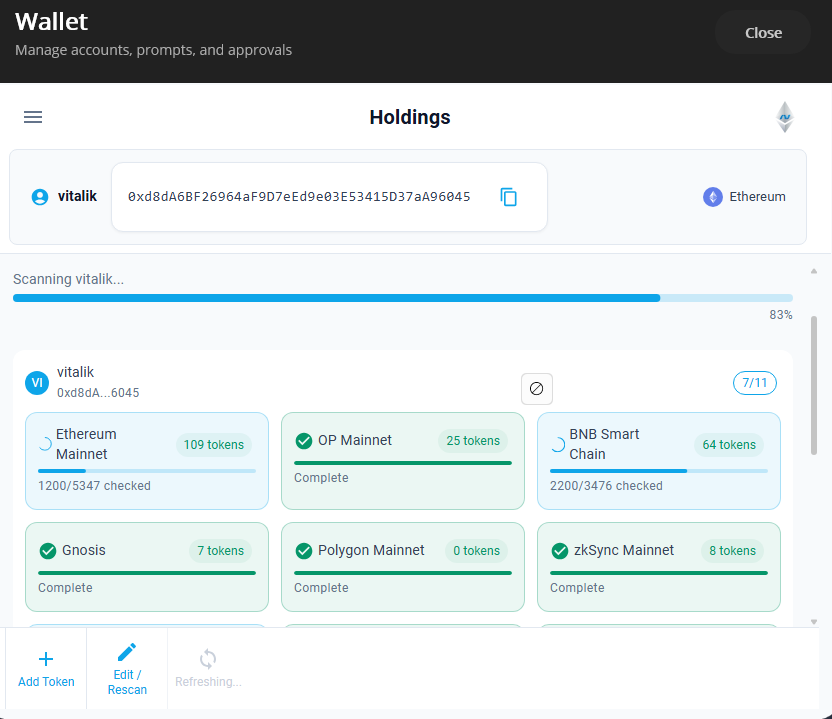
For applications that manage multiple wallets -- a portfolio tracker, an institutional dashboard, or a family wallet -- IMultiAccountTokenService scans multiple accounts across multiple chains with parallel execution and progress reporting.
using Nethereum.TokenServices.MultiAccount;
using Nethereum.TokenServices.MultiAccount.Models;
using Nethereum.TokenServices.ERC20.Discovery;

var multiAccountService = serviceProvider.GetRequiredService<IMultiAccountTokenService>();
var discoveryStrategy = serviceProvider.GetRequiredService<IDiscoveryStrategy>();

var accounts = new[]
{
    "0xd8dA6BF26964aF9D7eEd9e03E53415D37aA96045",
    "0xAb5801a7D398351b8bE11C439e05C5B3259aeC9B"
};

var chains = new[] { 1L, 137L, 42161L };

var result = await multiAccountService.ScanAsync(
    accounts,
    chains,
    web3Factory: chainId => new Web3(GetRpcUrl(chainId)),
    strategy: discoveryStrategy,
    options: new MultiAccountScanOptions
    {
        MaxParallelChains = 3,
        PageSize = 100,
        IncludeNativeToken = true,
        IncludeZeroBalances = false
    },
    progress: new Progress<MultiAccountProgress>(p =>
    {
        Console.WriteLine(
            $"Progress: {p.OverallPercentComplete:F1}% " +
            $"({p.CompletedChains}/{p.TotalChains} chains, " +
            $"{p.TokensFound} tokens found)");
    }));
The web3Factory delegate receives a chain ID and must return an IWeb3 instance configured for that chain's RPC endpoint.
MultiAccountScanOptions controls the scan behavior:
| Property | Default | Description |
|---|---|---|
MaxParallelChains | 3 | How many chains to scan concurrently |
PageSize | 100 | Number of tokens per multicall batch |
DelayBetweenPagesMs | 300 | Delay between batches (helps with rate limits) |
IncludeNativeToken | true | Whether to include ETH/MATIC/etc. |
IncludeZeroBalances | false | Whether to include tokens with zero balance |
The MultiAccountScanResult organizes results two ways -- by chain and by account:
if (result.Success)
{
    Console.WriteLine($"Scanned {result.TotalChainsScanned} chains, " +
                      $"found {result.TotalTokensFound} tokens");

    foreach (var (chainId, chainResult) in result.ChainResults)
    {
        Console.WriteLine($"  Chain {chainId}: {chainResult.TokensFound} tokens " +
                          $"(checked {chainResult.TokensChecked}, strategy: {chainResult.StrategyUsed})");
    }

    foreach (var (account, accountResult) in result.AccountResults)
    {
        Console.WriteLine($"  Account {account}: {accountResult.TokensFound} tokens");
        foreach (var (chainId, tokenBalances) in accountResult.TokensByChain)
        {
            Console.WriteLine($"    Chain {chainId}: {tokenBalances.Count} tokens");
        }
    }
}
To update prices without re-scanning balances (useful for a periodic price ticker), use RefreshPricesAsync:
var accountTokens = new List<(string account, long chainId, IEnumerable<TokenBalance> tokens)>
{
    ("0xd8dA6BF26964aF9D7eEd9e03E53415D37aA96045", 1, ethereumBalances),
    ("0xd8dA6BF26964aF9D7eEd9e03E53415D37aA96045", 137, polygonBalances),
};

var priceResult = await multiAccountService.RefreshPricesAsync(accountTokens, currency: "usd");
Discovery Strategies
The discovery strategy determines how tokens are found for an account. The strategy is used by IMultiAccountTokenService and the TokenDiscoveryEngine. Two built-in strategies are provided, and you can implement your own.
Decision table:
| Strategy | Speed | RPC Cost | Coverage | Best For |
|---|---|---|---|---|
TokenListDiscoveryStrategy | Fast | Low | Well-known tokens only | Production wallets, most users |
EventLogDiscoveryStrategy | Slow | High | Every token ever received | Power users, archive queries |
Custom (IDiscoveryStrategy) | Varies | Varies | You decide | Etherscan API, subgraphs, etc. |
TokenListDiscoveryStrategy (the default) loads the known token list for the chain and multicalls balanceOf for each one. It is fast and light on RPC calls, but will miss obscure or newly launched tokens that are not in the list.
EventLogDiscoveryStrategy scans all ERC-20 Transfer events where the account is sender or receiver. This finds every token the account has ever interacted with, but requires scanning potentially millions of blocks. It works best with archive nodes or when you limit the block range.
To implement a custom strategy (for example, using an Etherscan-style API):
public class EtherscanDiscoveryStrategy : IDiscoveryStrategy
{
    public string StrategyName => "Etherscan";

    public async Task<TokenDiscoveryResult> DiscoverAsync(
        IWeb3 web3,
        string accountAddress,
        long chainId,
        DiscoveryOptions options = null,
        IProgress<DiscoveryProgress> progress = null,
        CancellationToken ct = default)
    {
        // Call Etherscan API for token transfers
        // Extract unique token addresses
        // Get current balances via multicall
        return TokenDiscoveryResult.Successful(balances, progress, StrategyName);
    }

    public Task<bool> SupportsChainAsync(long chainId) => Task.FromResult(true);
    public Task<int> GetExpectedTokenCountAsync(long chainId) => Task.FromResult(0);
}
Register it via the DI builder:
services.AddErc20TokenServices()
    .UseDiscoveryStrategy<EtherscanDiscoveryStrategy>();
Token Catalog for Persistent Registries
The default token list is loaded fresh each time your application starts (from embedded data, then refreshed from CoinGecko). If you need a persistent, queryable token registry that survives restarts and supports incremental updates, use the Token Catalog.
Setting Up the Catalog
using Nethereum.TokenServices.ERC20.Catalog;

services.AddTokenCatalog(options =>
{
    options.CatalogDirectory = "/data/token-catalog";
    options.AutoSeedFromEmbedded = true;
    options.DefaultRefreshInterval = TimeSpan.FromHours(6);
    options.RegisterCoinGeckoSource = true;
});
The catalog stores token metadata as files in CatalogDirectory. On first use, it seeds itself from the embedded token list. The CoinGecko refresh source periodically pulls new tokens and updates.
Querying the Catalog
var repository = serviceProvider.GetRequiredService<ITokenCatalogRepository>();

var tokens = await repository.GetAllTokensAsync(chainId: 1);
Console.WriteLine($"Known tokens on Ethereum: {tokens.Count}");

var usdc = await repository.GetTokenByAddressAsync(
    chainId: 1,
    "0xA0b86991c6218b36c1d19D4a2e9Eb0cE3606eB48");
Console.WriteLine($"{usdc.Symbol}: {usdc.Name}");

var tokenCount = await repository.GetTokenCountAsync(chainId: 137);
Console.WriteLine($"Polygon tokens in catalog: {tokenCount}");
Refreshing From External Sources
The refresh service checks whether enough time has passed since the last refresh before making external calls:
var refreshService = serviceProvider.GetRequiredService<ITokenCatalogRefreshService>();

if (await refreshService.ShouldRefreshAsync(chainId: 1))
{
    var result = await refreshService.RefreshAsync(chainId: 1, new CatalogRefreshOptions
    {
        IncrementalOnly = true,
        UpdateExistingTokens = false
    });

    Console.WriteLine($"Added {result.TotalTokensAdded} new tokens from {result.SourceUsed}");
    Console.WriteLine($"Total in catalog: {result.TotalTokensInCatalog}");
}
Bridging the Catalog Into Erc20TokenService
To use the catalog as the token list source for balance queries, wrap it with CatalogTokenListProviderAdapter:
var adapter = new CatalogTokenListProviderAdapter(repository, autoSeed: true);
var tokenService = new Erc20TokenService(tokenListProvider: adapter);

// Now GetAllBalancesAsync uses the catalog's token list
var balances = await tokenService.GetAllBalancesAsync(web3, address, chainId: 1);
The autoSeed parameter ensures the catalog is initialized from embedded data if it has not been seeded yet.
Dependency Injection Setup
For applications using Microsoft.Extensions.DependencyInjection, a single call registers all the token services:
services.AddErc20TokenServices();
This registers IErc20TokenService, ITokenListProvider, ITokenBalanceProvider, ITokenPriceProvider, ITokenEventScanner, IDiscoveryStrategy, and IMultiAccountTokenService -- all as singletons.
To customize behavior, pass options:
services.AddErc20TokenServices(options =>
{
    options.DefaultCurrency = "usd";
    options.PriceCacheExpiry = TimeSpan.FromMinutes(5);
    options.TokenListCacheExpiry = TimeSpan.FromDays(7);
    options.MultiCallBatchSize = 100;
    options.UseFileCache = true;
    options.CacheDirectory = "/data/cache";
});
The builder returned by AddErc20TokenServices lets you swap any internal component:
services.AddErc20TokenServices()
    .UseTokenListProvider<MyTokenListProvider>()
    .UsePriceProvider<MyPriceProvider>()
    .UseDiscoveryStrategy<MyDiscoveryStrategy>()
    .UseCacheProvider<RedisCacheProvider>();
Registered Services
| Interface | Default Implementation | Lifetime |
|---|---|---|
IErc20TokenService | Erc20TokenService | Singleton |
ITokenListProvider | ResilientTokenListProvider | Singleton |
ITokenBalanceProvider | MultiCallBalanceProvider | Singleton |
ITokenPriceProvider | CoinGeckoPriceProvider | Singleton |
ITokenEventScanner | Erc20EventScanner | Singleton |
IDiscoveryStrategy | TokenListDiscoveryStrategy | Singleton |
IMultiAccountTokenService | MultiAccountTokenService | Singleton |
Common Gotchas
CoinGecko rate limits. The free CoinGecko API allows roughly 10-30 calls per minute. The CoinGeckoPriceProvider caches results (default: 5 minutes), but if you make rapid successive calls for different chains or large token sets, you can hit 429 errors. Increase PriceCacheExpiry or add delays between price requests in high-throughput scenarios.
Missing tokens in price results. Not every ERC-20 token is listed on CoinGecko. If TokenBalance.Price is null after a priced query, the token was not found in CoinGecko's database. Your UI should handle this gracefully (show balance without value, or mark as "price unavailable").
Chain support. The embedded token list covers: Ethereum (1), Optimism (10), BNB Chain (56), Gnosis (100), Polygon (137), zkSync Era (324), Base (8453), Arbitrum One (42161), Celo (42220), Avalanche (43114), and Linea (59144). For other chains, you need to provide a custom ITokenListProvider or use the catalog with manual seeding.
Multicall gas limits. The default PageSize of 100 works on all major chains. If you are targeting a chain with very low block gas limits, reduce the page size. The multicall batches balanceOf calls, so each page is a single eth_call that must fit within the node's gas cap.
Contract address casing. All address comparisons and dictionary lookups in the pricing layer are case-insensitive (normalized to lowercase). You do not need to worry about checksum casing when passing addresses to TryGetPrice or GetPricesForTokensAsync.
Native token handling. Native tokens (ETH, MATIC, etc.) are queried via eth_getBalance, not via a contract call. They appear in results with IsNative = true and Token.Address set to null. Always check IsNative before using Token.Address.
Next Steps
- Chainlist RPC — Discover EVM chains and RPC endpoints
- Etherscan API — Query gas prices, account transactions, and contract data
- CoinGecko API — Fetch token metadata and prices directly
- ABI Retrieval — Fetch contract ABIs for decoded interactions
- Nethereum.TokenServices — Full package API reference