Transaction Simulation
Before signing a transaction, you often want to know exactly what will happen — which tokens move, how much gas it costs, and whether it will revert. The EVM simulator lets you run a full transaction locally against real blockchain state and extract every balance change, event, and sub-call.
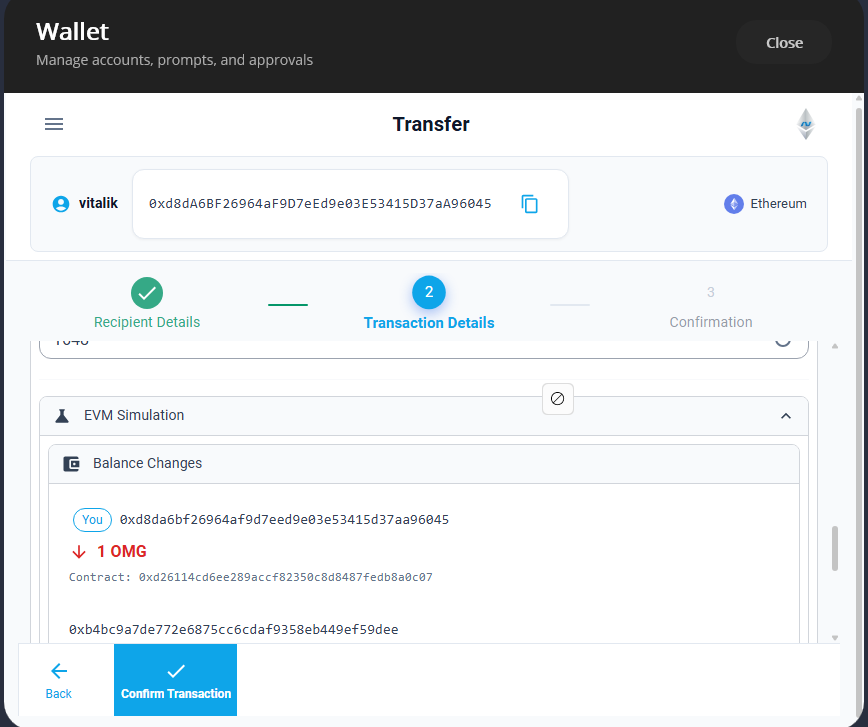
This is the same pattern used by the Nethereum Wallet to show users a transaction preview before they confirm.
var executor = new TransactionExecutor(HardforkConfig.Default);
var result = await executor.ExecuteAsync(ctx);
// result.Success, result.GasUsed, result.Logs, result.Traces
The TransactionExecutor handles gas calculation, EIP-1559 fees, and state management automatically.
Prerequisites
dotnet add package Nethereum.EVM
dotnet add package Nethereum.Web3
You need an RPC endpoint (Infura, Alchemy, or a local node) to fetch blockchain state.
The Simulation Pipeline
Transaction simulation follows a 5-step pipeline:
- Connect — create an
RpcNodeDataServiceto fetch state from a real node - Build context — set up
TransactionExecutionContextwith sender, target, calldata, and block parameters - Execute — run through
TransactionExecutorwhich handles the full EVM execution - Decode — use
ProgramResultDecoderto turn raw results into decoded call trees and events - Extract — use
StateChangesExtractorto identify all balance changes
Step 1: Connect to Blockchain State
The EVM simulator needs real blockchain state (account balances, contract code, storage) to simulate accurately. RpcNodeDataService fetches this data on demand and caches it locally.
using Nethereum.EVM.BlockchainState;
using Nethereum.RPC.Eth.DTOs;
using Nethereum.Web3;

var web3 = new Web3("https://mainnet.infura.io/v3/YOUR_KEY");

var blockNumber = await web3.Eth.Blocks.GetBlockNumber.SendRequestAsync();
var block = await web3.Eth.Blocks.GetBlockWithTransactionsHashesByNumber
    .SendRequestAsync(blockNumber);

var nodeDataService = new RpcNodeDataService(web3.Eth, new BlockParameter(blockNumber));
var executionStateService = new ExecutionStateService(nodeDataService);
Pinning to a specific block number ensures consistent state throughout the simulation — the same storage values and balances are used for every read.
Step 2: Build the Execution Context
TransactionExecutionContext holds everything the EVM needs: the transaction fields, block context, and state service.
using Nethereum.EVM.Execution;
using Nethereum.Hex.HexConvertors.Extensions;
using System.Numerics;

var ctx = new TransactionExecutionContext
{
    Mode = ExecutionMode.Call,  // Simulate without gas payment
    Sender = "0xYourAddress",
    To = "0xContractAddress",
    Data = "0xa9059cbb...".HexToByteArray(),  // ABI-encoded function call
    GasLimit = 10_000_000,
    Value = BigInteger.Zero,
    GasPrice = (BigInteger)block.BaseFeePerGas.Value + 1_000_000_000,
    MaxFeePerGas = (BigInteger)block.BaseFeePerGas.Value + 1_000_000_000,
    MaxPriorityFeePerGas = 1_000_000_000,
    Nonce = BigInteger.Zero,
    IsEip1559 = true,
    IsContractCreation = false,
    BlockNumber = (long)blockNumber.Value,
    Timestamp = (long)block.Timestamp.Value,
    BaseFee = block.BaseFeePerGas.Value,
    Coinbase = "0x0000000000000000000000000000000000000000",
    BlockGasLimit = 30_000_000,
    ExecutionState = executionStateService,
    TraceEnabled = true
};
ExecutionMode.Call simulates the transaction without requiring the sender to have enough ETH for gas — this is the same as eth_call. Use ExecutionMode.Transaction when you want full gas payment validation.
Step 3: Execute
var config = HardforkConfig.Default;  // Prague rules (latest)
var executor = new TransactionExecutor(config);
var execResult = await executor.ExecuteAsync(ctx);
The executor runs the full EVM pipeline: intrinsic gas calculation, contract code loading, opcode execution, sub-calls, and gas refund accounting.
HardforkConfig controls which EIPs are active. Use HardforkConfig.Cancun for Cancun-era rules or HardforkConfig.Prague (the default) for the latest.
Step 4: Decode the Result
Raw execution results contain byte arrays and log entries. The ProgramResultDecoder transforms these into decoded function calls, event names, and error messages using ABI information.
using Nethereum.EVM.Decoding;
using Nethereum.ABI.ABIRepository;

var decoder = new ProgramResultDecoder(abiStorage);
var decoded = decoder.Decode(execResult, callInput, chainId);

// Human-readable summary of the entire execution
Console.WriteLine(decoded.ToHumanReadableString());
The decoder needs an IABIInfoStorage to look up function signatures and event topics. In the wallet, this is populated from Sourcify and Etherscan. For simple cases, you can use a local ABI registry.
Step 5: Extract State Changes
The final step identifies every balance change — ETH transfers, ERC-20 token movements, NFT transfers — from the decoded result.
using Nethereum.EVM.StateChanges;

var extractor = new StateChangesExtractor();
var stateChanges = extractor.ExtractFromDecodedResult(
    decoded, executionStateService, "0xCurrentUserAddress");

// Print a summary
Console.WriteLine(stateChanges.ToSummaryString());

// Inspect individual changes
foreach (var change in stateChanges.BalanceChanges)
{
    var direction = change.Change > 0 ? "+" : "";
    Console.WriteLine($"{change.Address}: {direction}{change.Change} ({change.Type})");
}
The extractor consolidates duplicate changes per address/token pair and removes net-zero changes. Results are ordered with the current user's changes first.
Checking for Reverts
If the transaction would revert, execResult.Success is false and you can decode the error:
if (!execResult.Success)
{
    var revertMsg = execResult.RevertReason ?? execResult.Error;
    Console.WriteLine($"Transaction would revert: {revertMsg}");

    // For custom errors, decode from return data
    if (decoded.RevertReason != null)
    {
        Console.WriteLine($"Error: {decoded.RevertReason.GetDisplayMessage()}");
    }
}
Always check execResult.Success before extracting state changes — reverted transactions still produce partial traces but the state changes are meaningless.
Complete Example: Wallet Preview Pattern
This is the complete pattern used by StateChangesPreviewService in the Nethereum Wallet:
using Nethereum.EVM;
using Nethereum.EVM.BlockchainState;
using Nethereum.EVM.Decoding;
using Nethereum.EVM.Execution;
using Nethereum.EVM.StateChanges;
using Nethereum.RPC.Eth.DTOs;
using Nethereum.Web3;

// 1. Connect
var web3 = new Web3("https://mainnet.infura.io/v3/YOUR_KEY");
var blockNumber = await web3.Eth.Blocks.GetBlockNumber.SendRequestAsync();
var block = await web3.Eth.Blocks.GetBlockWithTransactionsHashesByNumber
    .SendRequestAsync(blockNumber);

var nodeDataService = new RpcNodeDataService(web3.Eth, new BlockParameter(blockNumber));
var executionState = new ExecutionStateService(nodeDataService);

// 2. Build context
var ctx = new TransactionExecutionContext
{
    Mode = ExecutionMode.Call,
    Sender = callInput.From,
    To = callInput.To,
    Data = callInput.Data?.HexToByteArray(),
    GasLimit = 10_000_000,
    Value = callInput.Value?.Value ?? BigInteger.Zero,
    GasPrice = block.BaseFeePerGas.Value + 1_000_000_000,
    MaxFeePerGas = block.BaseFeePerGas.Value + 1_000_000_000,
    MaxPriorityFeePerGas = 1_000_000_000,
    Nonce = BigInteger.Zero,
    IsEip1559 = true,
    BlockNumber = (long)blockNumber.Value,
    Timestamp = (long)block.Timestamp.Value,
    BaseFee = block.BaseFeePerGas.Value,
    Coinbase = "0x0000000000000000000000000000000000000000",
    BlockGasLimit = 30_000_000,
    ExecutionState = executionState,
    TraceEnabled = true
};

// 3. Execute
var executor = new TransactionExecutor(HardforkConfig.Default);
var execResult = await executor.ExecuteAsync(ctx);

// 4. Decode
var decoder = new ProgramResultDecoder(abiStorage);
var decoded = decoder.Decode(execResult, callInput, chainId);

// 5. Extract state changes
var extractor = new StateChangesExtractor();
var stateChanges = extractor.ExtractFromDecodedResult(
    decoded, executionState, currentUserAddress);

if (!execResult.Success)
{
    stateChanges.Error = execResult.RevertReason ?? "Transaction would revert";
}

stateChanges.Traces = execResult.Traces;
stateChanges.GasUsed = execResult.GasUsed;
Next Steps
- Call Tree Decoding — inspect the full call hierarchy with decoded function names and parameters
- Log Extraction — extract and decode all events emitted during execution
- Revert Decoding — decode custom errors and revert reasons