Blockchain Explorer
Nethereum.Explorer is a full-featured blockchain explorer built as a Blazor Server Razor Class Library (RCL). You can use it two ways:
-
Standalone with Aspire — The
dotnet new nethereum-devchaintemplate gives you a complete solution: DevChain + Indexer + Explorer + PostgreSQL, all orchestrated by .NET Aspire with service discovery, health checks, and OpenTelemetry. One command and you have a running explorer. -
Embedded in your app — Add the
Nethereum.ExplorerNuGet package to any Blazor Server application and wire it to your own indexed database and RPC endpoint.
The explorer reads from the indexed database (populated by the blockchain processor and token indexer) and adds live RPC queries for real-time data.
Package: Nethereum.Explorer
dotnet add package Nethereum.Explorer
Features
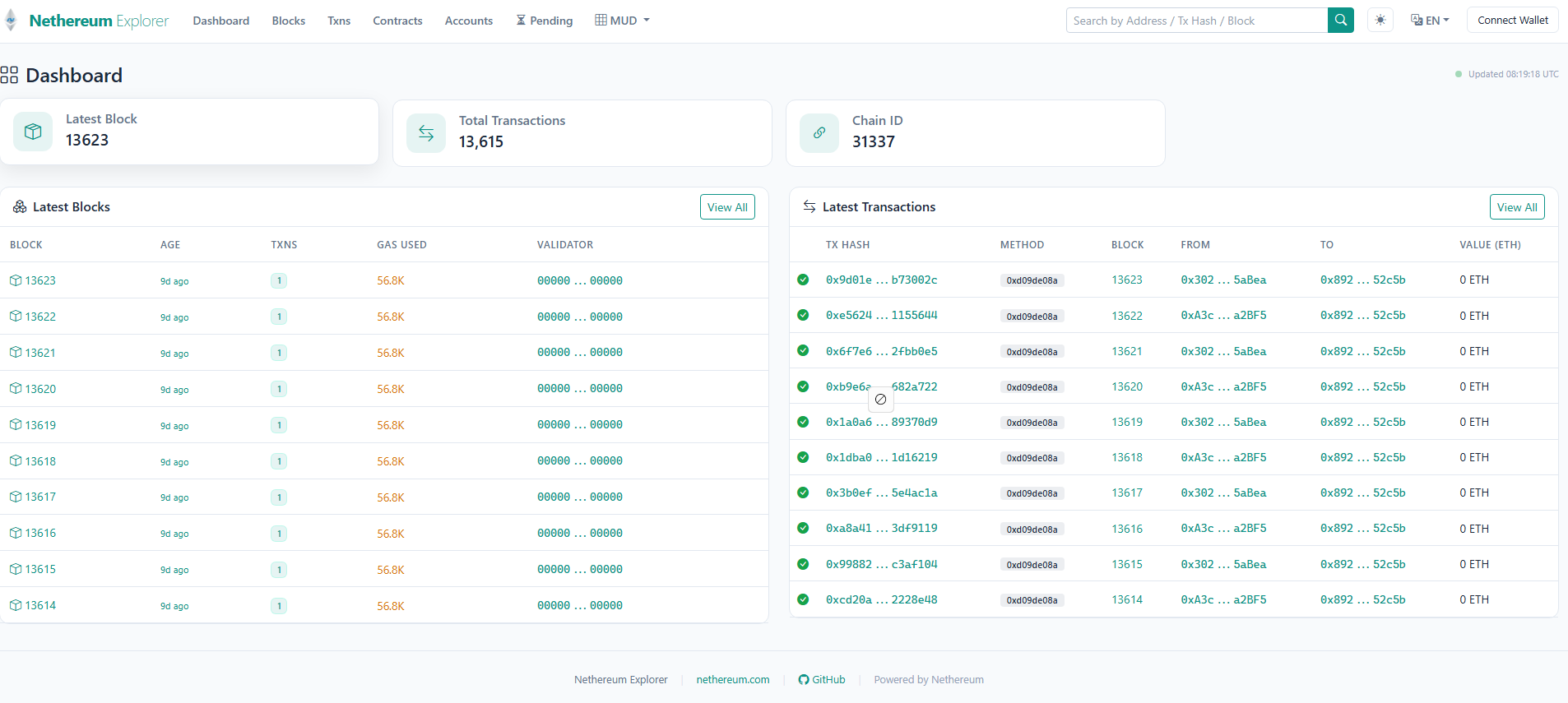
Block & Transaction Browsing
- Blocks page — Paginated block list with gas usage, CSV export
- Block detail — Full headers (state root, receipts root, withdrawals root), transaction list
- Transactions page — Paginated transaction list with CSV export
- Transaction detail — Status, gas breakdown, decoded input data, event logs, internal transactions
- Blob data (EIP-4844 type 3) — Blob commitments and proofs display
- EIP-7702 authorizations (type 4) — Authorization list display
Account & Contract Pages
- Accounts page — Paginated address list with EOA/contract badges
- Account detail — Balance, nonce, QR code, transaction history with direction filter
- Account tokens — Token balances, NFT inventory, transfer history (requires token indexing)
- Contracts page — Paginated list with creator address and deployment transaction
- Contract detail — ABI-decoded read/write functions, event history, bytecode, source code
- Proxy detection — Automatically detects proxy contracts and links to implementation

Token Features
- Token balances per account (ERC-20/721/1155)
- NFT inventory with token IDs and amounts
- Transfer history per account or per token contract
- Token metadata — name, symbol, decimals, type
- REST API —
/api/tokens/{address}/balances,/api/tokens/{address}/nfts,/api/tokens/{address}/transfers
EVM Debugger
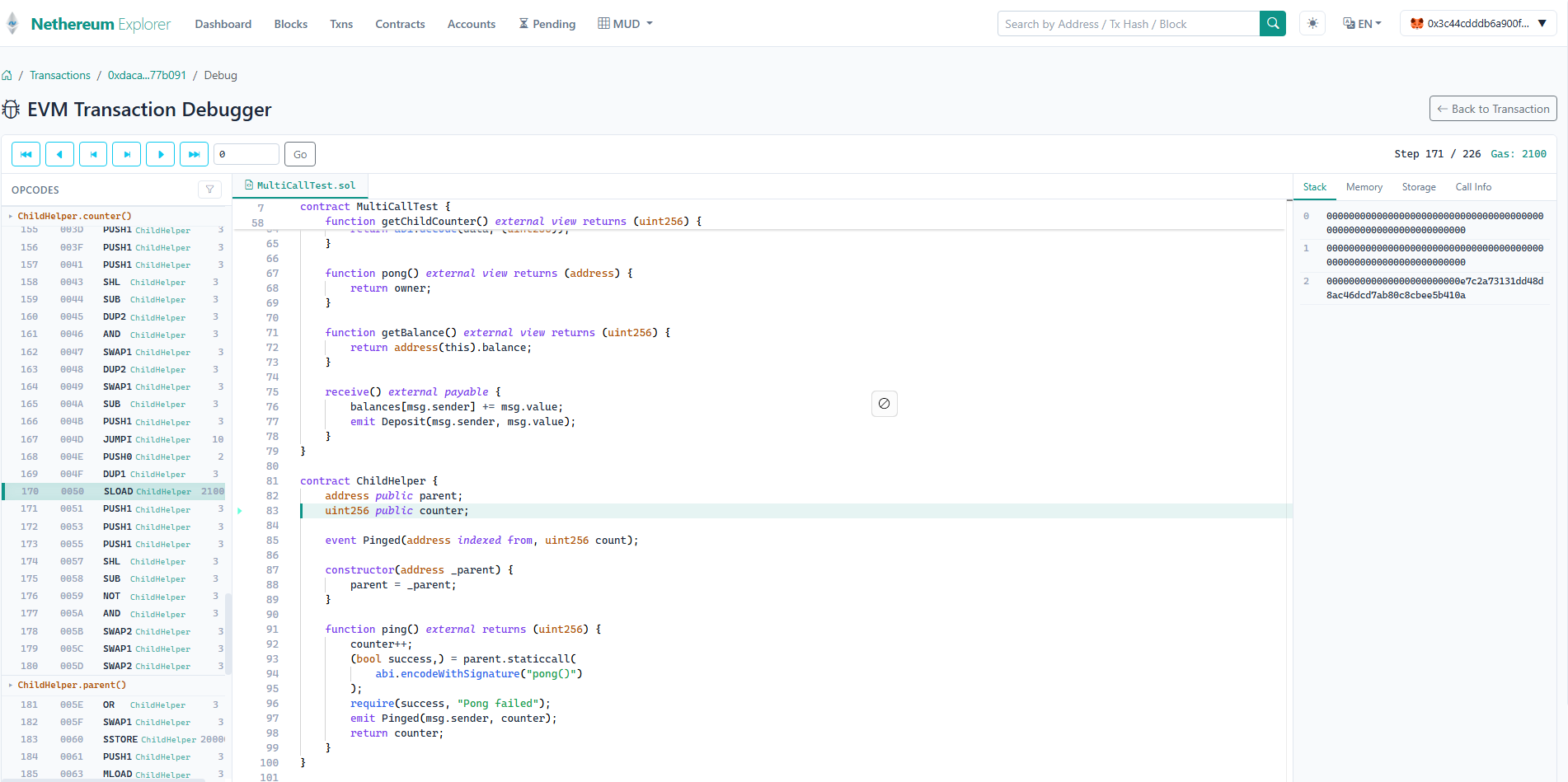
- Opcode step-through — Replay any transaction instruction by instruction
- Solidity source mapping — See which Solidity line corresponds to each opcode (requires source)
- Memory/stack/storage inspection — View EVM state at each step
- Requires
debug_traceTransactionRPC support
MUD World Browser
- MUD Worlds page — List deployed MUD World contracts
- MUD Tables — Browse table schemas with key/value fields, normalised SQL indicator
- MUD Records — Raw hex view, decoded view, normalised SQL view, query builder

Search
- Search by block number, transaction hash, address, or ENS name
- Recent search history with quick access dropdown
UI Features
- Dark/light theme toggle (persisted to localStorage)
- English and Spanish localisation
- EIP-6963 browser wallet integration with
wallet_addEthereumChain - Breadcrumb navigation across detail pages
- Configurable branding (title, logo, favicon, currency symbol)
Quick Start — Aspire Template (Recommended)
The fastest way to get a running explorer is the Aspire template. One command gives you a DevChain, blockchain indexer, token indexer, PostgreSQL, and the explorer — all wired together with service discovery:
dotnet new install Nethereum.Aspire.TemplatePack
dotnet new nethereum-devchain -n MyExplorer
cd MyExplorer
dotnet run --project AppHost
Open the Aspire dashboard to see all four services running. The explorer URL is shown in the dashboard — click it to browse blocks, transactions, and contracts on your local DevChain.
What the template provides
The Aspire AppHost orchestrates four services with explicit startup ordering:
AppHost (Aspire Orchestrator)
├── PostgreSQL — managed container with persistent data volume
├── DevChain — in-process Ethereum node (pre-funded accounts, configurable chain ID)
├── Indexer — background worker (waits for DevChain + Postgres)
│   ├── Runs EF Core migrations on startup (blockchain + token + MUD schemas)
│   ├── Block/transaction/log indexing to PostgreSQL
│   ├── Internal transaction tracing (debug_traceTransaction)
│   ├── Token transfer denormalisation and balance aggregation
│   └── MUD World record indexing (auto-discovers World contracts or uses configured address)
└── Explorer — Blazor Server UI (waits for Indexer)
    ├── Resolves RPC URL via Aspire service discovery
    ├── Connects to PostgreSQL for indexed data
    ├── Full explorer with token pages, MUD browser, EVM debugger
    ├── EIP-6963 browser wallet integration
    ├── Token and Contract REST API endpoints
    └── Pre-configured with dev account for write operations
AppHost wiring
// AppHost/Program.cs
var postgresServer = builder.AddPostgres("postgres")
    .WithDataVolume("nethereum-pgdata");
var postgres = postgresServer.AddDatabase("nethereumdb");

var devchain = builder.AddProject<Projects.DevChain>("devchain");

var indexer = builder.AddProject<Projects.Indexer>("indexer")
    .WithReference(postgres)
    .WithReference(devchain)
    .WaitFor(devchain)
    .WaitFor(postgres);

var devAccountKey = builder.AddParameter("devAccountPrivateKey", secret: true);

var explorer = builder.AddProject<Projects.Explorer>("explorer")
    .WithReference(postgres)
    .WithReference(devchain)
    .WaitFor(indexer)
    .WithEnvironment("Explorer__DevAccountPrivateKey", devAccountKey)
    .WithEnvironment("Explorer__EnablePendingTransactions", "true");
How the Indexer works
The Indexer is a .NET Worker that runs all indexing as hosted services:
// Indexer/Program.cs — resolves DevChain URL via Aspire service discovery
var devchainUrl = builder.Configuration["services:devchain:http:0"]
    ?? builder.Configuration["BlockchainProcessing:BlockchainUrl"];

// Run EF Core migrations on startup (idempotent)
using var blockchainContext = new PostgresBlockchainDbContext(connectionString);
await blockchainContext.Database.MigrateAsync();

// Register all indexing services
builder.Services.AddPostgresBlockchainProcessor(builder.Configuration, connectionString);
builder.Services.AddPostgresInternalTransactionProcessor();
builder.Services.AddTokenDenormalizerProcessing(builder.Configuration, connectionString);
builder.Services.AddTokenBalanceAggregationProcessing(builder.Configuration, connectionString);

// MUD indexing — auto-discovers World contracts or uses configured address
var mudAddress = builder.Configuration["MudProcessing:Address"];
if (!string.IsNullOrWhiteSpace(mudAddress))
    builder.Services.AddMudPostgresProcessing(builder.Configuration, connectionString);
else
    builder.Services.AddMudWorldAddressDiscovery(builder.Configuration, connectionString);
How the Explorer connects
The Explorer resolves both the database and RPC URL via Aspire service discovery — no manual configuration:
// Explorer/Program.cs — connection via Aspire service references
var connectionString = builder.Configuration.GetConnectionString("nethereumdb");

builder.Services.AddPostgresBlockchainStorage(connectionString);
builder.Services.AddTokenPostgresRepositories(connectionString);

// MUD support with normalised SQL queries
builder.Services.AddDbContext<MudPostgresStoreRecordsDbContext>(options =>
    options.UseNpgsql(connectionString).UseLowerCaseNamingConvention());

// RPC URL resolved from Aspire service discovery
var devchainUrl = builder.Configuration["services:devchain:http:0"]
    ?? builder.Configuration["Explorer:RpcUrl"];
builder.Configuration["Explorer:RpcUrl"] = devchainUrl;

builder.Services.AddExplorerServices(builder.Configuration);

// Map API endpoints
app.MapTokenApiEndpoints();
app.MapContractApiEndpoints();
Template parameters
dotnet new nethereum-devchain -n MyChain \
    --NethereumVersion 6.0.0 \
    --ChainId 31337 \
    --AspireVersion 9.2.0
Embedding in Your Own App
If you already have a Blazor Server application and want to add the explorer:
With existing indexed database
var builder = WebApplication.CreateBuilder(args);
var connectionString = "Host=localhost;Database=blockchain;Username=postgres;Password=secret";

// Connect to indexed blockchain data
builder.Services.AddPostgresBlockchainStorage(connectionString);

// Optional: enable token pages
builder.Services.AddTokenPostgresRepositories(connectionString);

// Register explorer services
builder.Services.AddExplorerServices(builder.Configuration);

var app = builder.Build();
app.MapRazorComponents<App>().AddInteractiveServerRenderMode();
app.Run();
Full stack (indexer + explorer in one process)
var builder = WebApplication.CreateBuilder(args);
var connectionString = "Host=localhost;Database=blockchain;Username=postgres;Password=secret";

// Blockchain indexing
builder.Services.AddPostgresBlockchainProcessor(builder.Configuration, connectionString);
builder.Services.AddPostgresInternalTransactionProcessor();

// Token indexing
builder.Services.AddTokenLogPostgresProcessing(builder.Configuration, connectionString);
builder.Services.AddTokenDenormalizerProcessing(builder.Configuration, connectionString);
builder.Services.AddTokenBalanceAggregationProcessing(builder.Configuration, connectionString);

// Explorer UI
builder.Services.AddExplorerServices(builder.Configuration);

var app = builder.Build();
app.MapRazorComponents<App>().AddInteractiveServerRenderMode();
app.Run();
Configuration
All explorer settings go under the Explorer section in appsettings.json:
{
  "Explorer": {
    "RpcUrl": "http://localhost:8545",
    "ChainName": "My Chain",
    "ChainId": 31337,
    "CurrencySymbol": "ETH",
    "CurrencyName": "Ether",
    "CurrencyDecimals": 18,
    "ExplorerTitle": "My Explorer",
    "ExplorerBrandName": "My",
    "ExplorerBrandSuffix": "Explorer",
    "LogoUrl": "/img/logo.png",
    "FaviconUrl": "/img/favicon.ico",
    "BlockExplorerUrl": null,
    "ApiKey": null,
    "EnableMud": true,
    "EnableTokens": true,
    "EnableTracing": true,
    "EnableInternalTransactions": true,
    "EnablePendingTransactions": false,
    "EnableEvmDebugger": true,
    "RpcRequestTimeoutSeconds": 30
  }
}
Feature Toggles
| Toggle | Default | What It Controls |
|---|---|---|
EnableTokens | true | Token balance/transfer pages and API |
EnableInternalTransactions | true | Internal transaction display on tx detail |
EnableTracing | true | State diff display (requires debug_traceTransaction) |
EnableEvmDebugger | true | Debug button on transaction pages |
EnablePendingTransactions | false | Pending transactions page in navbar |
EnableMud | true | MUD World browser pages |
Token features are automatically disabled if the token repositories aren't registered, regardless of the toggle.
Branding
| Property | Default | Description |
|---|---|---|
ExplorerTitle | "Nethereum Explorer" | Browser tab title |
ExplorerBrandName | "Nethereum" | Navbar brand text |
ExplorerBrandSuffix | "Explorer" | Navbar brand suffix |
LogoUrl | null | Logo image URL |
FaviconUrl | null | Favicon URL |
ChainName | "DevChain" | Chain display name |
CurrencySymbol | "ETH" | Native currency symbol |
CurrencyName | "Ether" | Currency full name |
ABI Source Configuration
The explorer resolves contract ABIs through a configurable chain of sources. Configure under Explorer:AbiSources:
{
  "Explorer": {
    "AbiSources": {
      "SourcifyEnabled": true,
      "EtherscanEnabled": false,
      "EtherscanApiKey": null,
      "FourByteEnabled": false,
      "LocalStorageEnabled": false,
      "LocalStoragePath": null,
      "SourceBasePath": null
    }
  }
}
Resolution order: In-memory cache > Local filesystem > Sourcify > Etherscan > 4Byte
When an ABI is found, it's cached in memory for subsequent requests. You can also upload ABIs via the Contract API.
Contract API
| Method | Route | Description |
|---|---|---|
GET | /api/contracts/{address}/abi | Retrieve stored ABI |
POST | /api/contracts/{address}/abi | Upload ABI ({ "abi": "...", "name": "..." }) |
POST | /api/contracts/batch | Batch upload (max 50 contracts) |
POST endpoints validate the X-Api-Key header if ApiKey is configured. Rate limited to 100 requests per minute.
Token API
| Method | Route | Description |
|---|---|---|
GET | /api/tokens/{address}/balances | Token balances for address |
GET | /api/tokens/{address}/nfts | NFT inventory for address |
GET | /api/tokens/{address}/transfers | Token transfer history (paginated) |
GET | /api/tokens/contract/{contractAddress}/transfers | Transfers for token contract |
GET | /api/tokens/contract/{contractAddress}/metadata | Token name, symbol, decimals, type |
Returns 503 if token repositories are not configured.
Pages Reference
| Route | Page | Features |
|---|---|---|
/ | Home | Latest blocks/txs, chain stats, auto-refresh, add-to-wallet |
/blocks | Blocks | Paginated list, gas usage, CSV export |
/block/{NumberOrHash} | Block Detail | Headers, state roots, transaction list |
/transactions | Transactions | Paginated list, CSV export |
/transaction/{TxHash} | Tx Detail | Status, gas, decoded input, logs, internal txs, blobs, EIP-7702 |
/transaction/{TxHash}/debug | EVM Debugger | Opcode step-through, Solidity mapping, memory/stack/storage |
/pending | Pending Txs | Pending and queued (requires feature toggle + RPC) |
/accounts | Accounts | Paginated addresses, EOA/contract badges |
/account/{Address} | Account Detail | Balance, nonce, QR code, tx history, token balances |
/account/{Address}/tokens | Account Tokens | Token balances, NFT inventory, transfers |
/contracts | Contracts | Paginated list, creator, creation tx |
/contract/{Address} | Contract Detail | ABI read/write, events, bytecode, source, proxy detection |
/mud | MUD Worlds | World address cards, table/record counts |
/mud/tables/{Address?} | MUD Tables | Table schemas, key/value fields |
/mud/records/{Address?}/{TableId?} | MUD Records | Raw hex, decoded, normalised SQL, query builder |
MUD Browser Setup
To enable the MUD World browser, register the MUD PostgreSQL context alongside the explorer:
builder.Services.AddDbContext<MudPostgresStoreRecordsDbContext>(options =>
    options.UseNpgsql(connectionString).UseLowerCaseNamingConvention());
The MUD browser shows deployed World contracts, their table schemas, and individual records with raw, decoded, and normalised SQL views.
Next Steps
- Blockchain Processing — Learn the core processing pipeline
- Database Storage — Set up database storage for the explorer to read
- Token Indexing — Enable token balance and transfer pages
- ABI Retrieval — Learn about the ABI resolution chain used by the explorer